
I previously wrote about how to reconnect a wireless printer after a power outage. Recently, I noticed that the same printer—a Canon PIXMA MegaTank G7020—had developed a color cast when printing in color. The question was: what was causing it?
In the previous post, I included an image of the printer’s “Control Panel,” adapted from the Canon website.
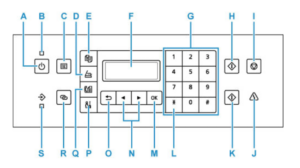
The user manual suggests going through the following steps to diagnose and fix the problem.
1. Nozzle Check
Press the Setup button (“P”).
Press right arrow key (”N”) four times to select Maintenance, then press OK (“M”).
Select Nozzle Check, then press OK.
Check the printed pattern. In my case, one of the colors was missing, as shown in Figure 1. This explained why the color prints had a noticeable pinkish cast.
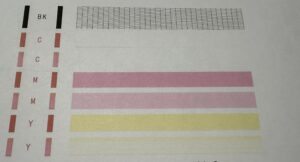
Figure 1. Nozzle Check result
2. Cleaning and Deep Cleaning
The manual recommends trying Cleaning first. If that doesn’t solve the problem, try Deep Cleaning.
Press the Setup button (“P”).
Press right arrow key (”N”) four times to select Maintenance, then press OK (“M”).
Press it once to select Cleaning, then press OK. If Deep Cleaning is needed, press once more and select it.
Afterward, perform another Nozzle Check, following the procedure in Step 1.
In my case, there was still no improvement.
3. Ink Flush
If the problem persists, the final step is an Ink Flush, which is intended to clear the ink passages. The process takes about eight minutes, and the ink tanks need to have at least one bar of ink remaining.
Press the Setup button (“P”).
Press right arrow key (”N”) four times to select Maintenance, then press OK (“M”).
Press right arrow key (”N”) seven times to select Ink Flush, then press OK and wait for about eight minutes.
Once again, perform a Nozzle Check as described in Step 1.
This time, the result was different (see Figure 2): the missing color had reappeared.
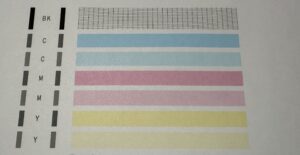
Figure 2. Nozzle Check result after Ink Flush
Finally, I reprinted one of the photos that had previously shown the color cast.
This time, it looked normal.
Problem solved.
Note that this post is also available in Chinese Revision (「順手寫在網邊:如何糾正打印機的偏色問題」).